01
소재 준비
원본 오디오, 선명한 캐릭터 참조 이미지, 그리고 립싱크 내용을 정의하는 가사 또는 대사를 준비하세요.
이 검은 화면 영상 워크플로를 사용하면 립싱크, MV 제작, 캐릭터 영상에서 Seedance 2.0이 참조 오디오를 훨씬 정확하게 따르게 할 수 있습니다.
문제
오디오 참조는 리듬과 간격이 어긋날 수 있습니다.
해결책
오디오 구간을 검은 화면 영상으로 입력하세요.
Seedance 2.0은 오디오 참조를 기본 지원하지만, 오디오를 그대로 참조로 사용하면 생성된 오디오와 원본 오디오 사이에 큰 차이가 생길 수 있습니다. 특히 음악에서 이 차이가 두드러집니다.

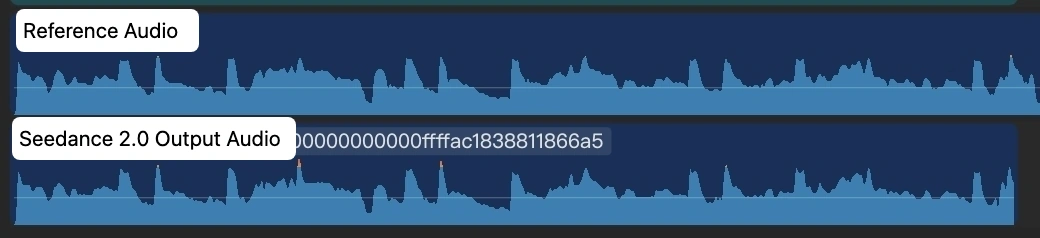
핵심 해결책은 간단합니다. 각 오디오 구간을 검은 화면 영상으로 변환한 다음, 그 영상을 Seedance 2.0의 입력으로 사용하세요.
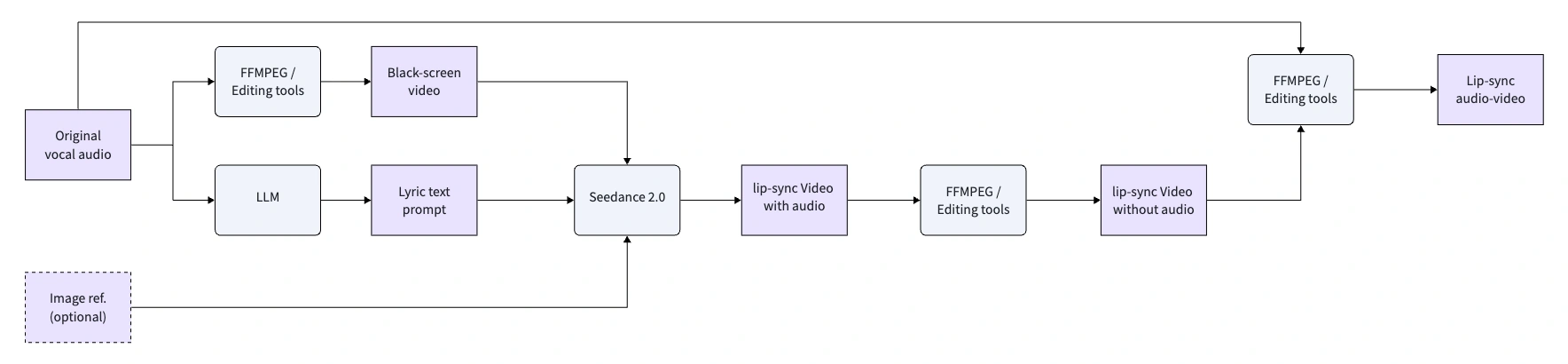
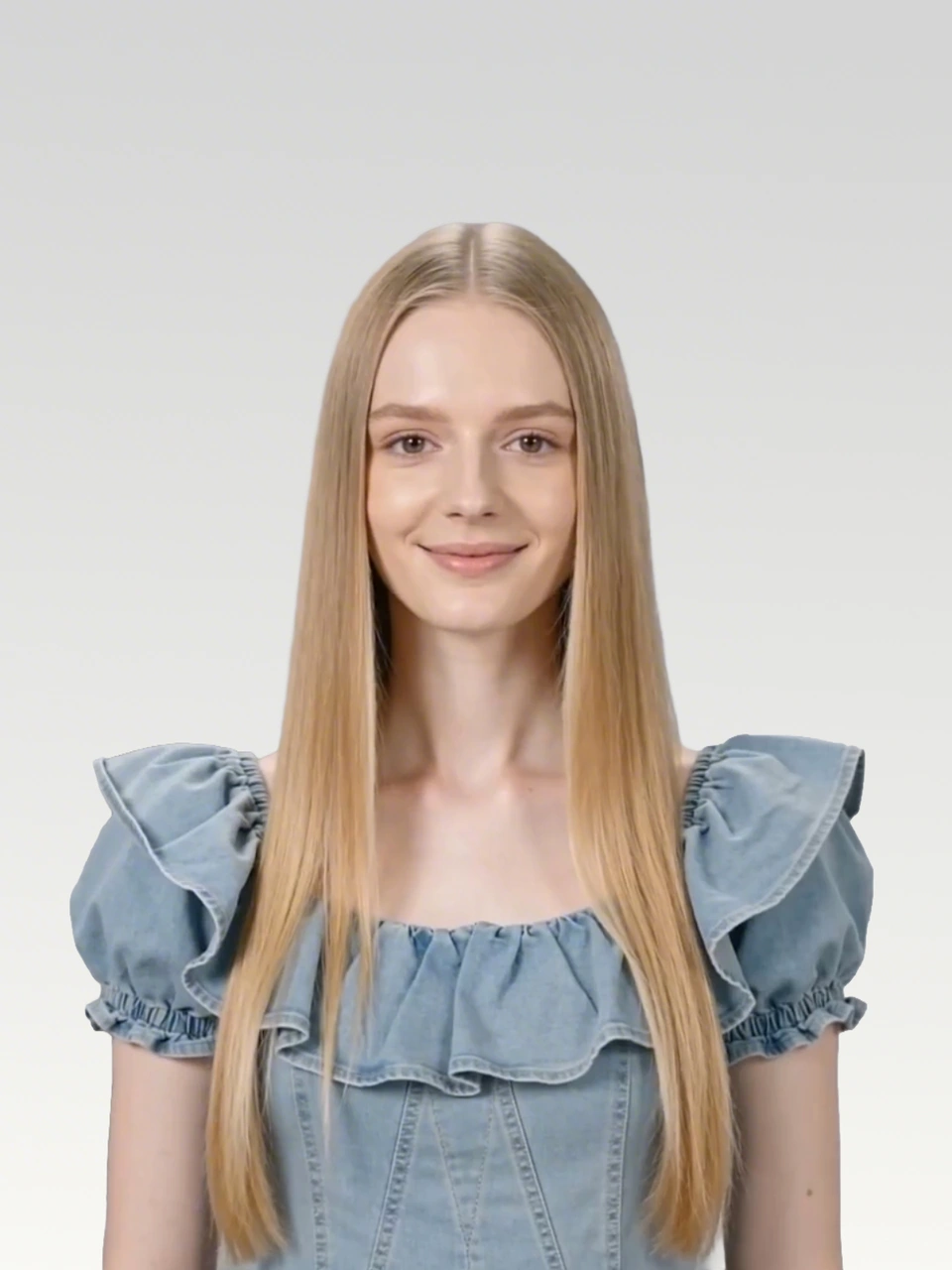
원본 오디오, 선명한 캐릭터 참조 이미지, 그리고 립싱크 내용을 정의하는 가사 또는 대사를 준비하세요.
Seedance 2.0은 최대 15초 길이의 영상만 지원하므로, 긴 음악이나 대사는 여러 개의 짧은 구간으로 나누세요.
원본 오디오 트랙이 포함된 검은 화면 MP4를 만드세요. 이렇게 하면 오디오가 Seedance가 더 정확히 따를 수 있는 영상 입력이 됩니다.
검은 화면 영상을 입력 참조로 사용하고, 출력 길이는 입력 영상 길이와 정확히 일치시키세요.
원본 오디오
Waking up to golden light. Coffee warm and feeling right.
Birds are singing just for me. Living life so wild and free.
This is my beautiful life. Every moment shining bright.
Dancing through the ups and downs. Wearing joy like a crown.
Beautiful life, oh yeah. Beautiful life
FFmpeg로 만들거나, CapCut 같은 영상 편집기에서 오디오 구간을 검은 캔버스 위에 올린 뒤 MP4로 내보내면 됩니다.
ffmpeg -f lavfi -i color=c=black:s=1280x720:r=24 -i clip1_audio.mp3 -shortest -c:v libx264 -c:a aac clip1.mp4각 구간은 검은 화면 영상을 참조 입력으로 사용하고, Seedance 2.0에 이미지 속 주인공을 정확한 립싱크로 움직이도록 요청합니다.
검은 화면 참조 영상과 Seedance 2.0 출력
프롬프트
Use the audio from @Video 1 to drive the protagonist in @Image 1 to generate an MV with multiple shots, creating an overall light, lively, and sunny atmosphere. Lip-sync is strictly synchronized: "woo~ woo~"
검은 화면 영상
출력 영상
검은 화면 참조 영상과 Seedance 2.0 출력
프롬프트
Use the audio from @Video 1 to drive the protagonist in @Image 1 to generate an MV with multiple shots, change the outfit and background, and create an overall light, lively, and sunny atmosphere. Lip-sync strictly: "Waking up to golden light. Coffee warm and feeling right."
검은 화면 영상
출력 영상
검은 화면 참조 영상과 Seedance 2.0 출력
프롬프트
Use the audio from @Video 1 to drive the protagonist in @Image 1 to generate an MV with multiple shots, change the outfit and background, and create an overall light, lively, and sunny atmosphere. Lip-sync strictly: "Birds are singing just for me. Living life so wild and free."
검은 화면 영상
출력 영상
검은 화면 참조 영상과 Seedance 2.0 출력
프롬프트
Use the audio from @Video 1 to drive the protagonist in @Image 1 to generate an MV with multiple shots, change the outfit and background, and create an overall light, lively, and sunny atmosphere. Lip-sync strictly: "This is my beautiful life"
검은 화면 영상
출력 영상
검은 화면 참조 영상과 Seedance 2.0 출력
프롬프트
Use the audio from @Video 1 to drive the protagonist in @Image 1 to generate an MV with multiple shots, change the outfit and background, and create an overall light, lively, and sunny atmosphere. Lip-sync strictly: "Every moment shining bright, Dancing through the ups and downs. Wearing joy like a crown."
검은 화면 영상
출력 영상
검은 화면 참조 영상과 Seedance 2.0 출력
프롬프트
Use the audio from @Video 1 to drive the protagonist in @Image 1 to generate an MV with multiple shots, change the outfit and background, and create an overall light, lively, and sunny atmosphere. Lip-sync strictly: "woo~ Beautiful life, oh yeah Beautiful life"
검은 화면 영상
출력 영상
출력 오디오가 입력 오디오와 100% 동일하지는 않지만, MV 제작 시 후반 작업 보정 비용을 줄일 수 있을 만큼 일관성이 충분합니다.
오디오 구간을 검은 화면 영상 참조로 변환한 뒤, SeeGen AI에서 더 일관된 립싱크 영상을 생성하세요.
Seedance 2 무료로 사용해 보기