01
Precise subject
Who or what is the main subject?
Learn how to write better Seedance 2.0 prompts for cinematic videos, product ads, UGC, anime, short drama, and music videos.
Use prompt formulas, timelines, reference materials, and practical examples to get more controlled AI video results.
A good Seedance 2.0 prompt should clearly explain who appears in the video, what happens, how the camera moves, what style to follow, and what to avoid. For video generation, subject and action are the most important parts. Other details like lighting, setting, camera movement, style, and constraints can be added based on your needs.
Original Prompt
A man walking in a market.
Optimized Prompt
A young man walking through a lively outdoor street market at golden hour. He holds a small bouquet of flowers and looks surprised when he notices someone off-camera. The camera starts with a close-up of the bouquet, then slowly pulls back to reveal the crowd. Warm sunlight, shallow depth of field, natural motion, stable face, clean hand details, no text, no watermark.
Optimized prompt result
A strong Seedance 2.0 prompt starts with a clear subject and action. These two are required. Other details, such as setting, lighting, camera movement, visual style, image quality, and constraints, are also recommended to make the result more controlled and consistent.
Who or what is the main subject?
What is the subject doing? What changes over time?
Where does the scene take place? What background details are included?
What is the time of day, lighting style, color tone, and mood?
How should the camera move or frame the subject?
What visual style should the video follow?
How clear, detailed, and polished should the video look?
What should the model avoid?
Basic Prompt Formula
Subject + Action + Setting + Lighting + Camera Movement + Visual Style + Quality + Constraints
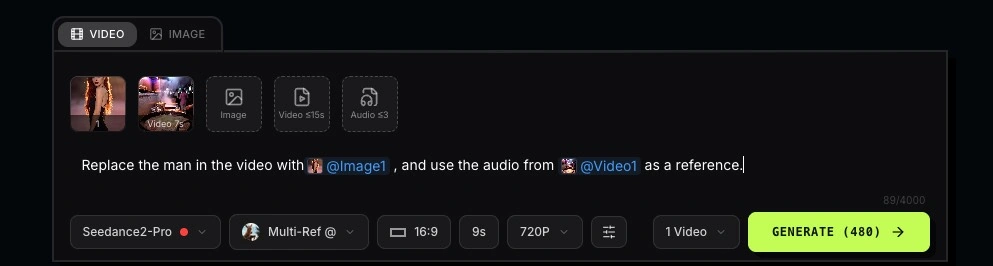
When you upload reference materials to Seedance 2.0, you can use @mentions in your prompt to tell the model how each file should be used. This is especially useful for Multi-Reference / Omni Reference workflows. Instead of letting the model guess, @mentions help Seedance 2.0 understand which reference controls the character, outfit, scene, motion, audio, or editing target.
Character reference
Use @image1 as the main character reference.
Outfit reference
Use @image2 as the outfit reference.
Scene reference
Use @image3 as the background and environment reference.
Motion reference
Use @video1 as the motion reference.
Audio reference
Use @audio1 as the rhythm or voice reference.
First & Last Frame
Use @image1 as the first frame and @image2 as the final frame.
Video Extend
Use @video1 as the previous clip and continue the same scene.
Video Edit
Use @video1 as the original video reference and change the background, outfit, or style.
Browse Seedance 2.0 prompt examples for cinematic videos, product ads, social media clips, UGC, anime, short drama, and music videos.
A dramatic horseback chase through a canyon at golden hour. A rider on a black stallion gallops at full speed along a narrow ledge, red dust billowing behind them. The canyon walls tower on both sides, glowing amber in the low sun. The horse leaps over a gap in the trail, all four hooves off the ground, mane and tail streaming. The camera tracks alongside from a parallel ridge. Rocks crumble from the ledge edge. The rider looks back over their shoulder. Hyper-realistic, epic Western cinematography, 8k, thundering hooves echoing off canyon walls.
(0-3s) Macro shot of a luxury perfume bottle among scattered pink peonies, shallow depth of field, petals floating in warm afternoon light, soft ambient music. (3-7s) Camera glides closer, a feminine hand enters frame from the right, fingers gently touch the glass bottle, the sound of silk rustling. (7-12s) Hard cut to slow-motion spray, golden mist diffuses through the air, particles catching rim light against a dark background, the hiss of the atomizer. (12-15s) Seamless pull-out to hero frame, product centered, volumetric lighting, minimal cream background, elegant silence. Hyper-realistic, 8k, fashion commercial cinematography.
A tight medium shot of two eccentric adults in typical, everyday clothing, one in a slightly oversized trench coat, the other in a weathered denim jacket, deep in a heated, animated conversation on a rainy West Village street corner. The one in the trench coat gestures wildly, the words “SOURDOUGH PRETZEL” appearing in pulsating electric blue: “It’s not just a pretzel, Arthur! It’s a sourdough pretzel!” The second guy says ‘Who cares. A pretzel’s a pretzel!’
A realistic young woman sitting casually in a softly lit bedroom during late afternoon. She is holding her phone very close to her face as if recording a private video or voice note. Framing is tight and slightly imperfect. Expression: thoughtful, slightly shy, natural. Minimal makeup, natural skin texture, relaxed clothing. Lighting: warm natural light fading from a window, soft shadows. Environment: simple bedroom, calm and lived-in. Style: ultra-realistic, looks like a real phone recording, slightly grainy, not cinematic.
Create a 10-second UGC-style fashion video. Use the girl in @Image1 as the main character. Keep her face, hairstyle, body shape, and overall vibe consistent throughout. Use @Image2 as the green top reference, and @Image3 as the handbag reference. [0s-2s] The girl faces the camera and holds up the green top from @Image2, showing it naturally with a cheerful expression. Then quickly transitioned to her wearing the green top. [3s-5s] She starts doing her makeup in front of the camera. [6s-7s] She fixes her hair while looking confident and stylish. [8s-10s] She picks up the handbag from @Image3 and presents it like a model. Keep the character, green top, and handbag consistent. Avoid deformation, outfit errors, hand issues, identity drift, and messy background.
Replace the man in black who is dribbling in @video1 with the girl from @image1. Keep the original scene, camera movement, dribbling motion, body posture, and basketball trajectory from @video1. The girl should closely follow the same movement and timing. Keep her face, hairstyle, and outfit consistent with @image1. No background change, no camera change, no body deformation, no hand errors, no ball clipping.
Use @image1 as the main reference image. Keep the character design, outfit, expression, and cute anime livestream style consistent throughout. Create a 15-second Japanese anime-style livestream video in a cozy bakery kitchen. The main character is a lively young female baker and livestream host, wearing the same outfit and headset style as @image1. Use warm lighting, soft pastel colors, and simple livestream UI elements such as a “LIVE” badge, floating hearts, comment bubbles, and product tags. Keep the UI clean and do not block the character. Include smiling, waving, kneading dough, presenting baked bread, natural Japanese lip sync, smooth camera movement, warm cozy lighting, and cute anime style. Avoid character inconsistency, outfit changes, dark lighting, cluttered UI, and oversized text.
[0-3s] Sweet Wedding: Mr. Mango and Miss Banana stand under a floral arch, smile at each other, and exchange rings in a bright warm wedding hall. [3-6s] The Intruder: Miss Strawberry bursts through the doors and shouts, “You can’t marry her! She’s a rotten banana!” [6-9s] The Reveal: Strawberry pulls down Banana’s dress hem, revealing a rotten blackened banana peel. Banana screams, “Wait! Let me explain!” [9-12s] Mango Runs Away: Mango runs toward the exit while Banana cries out. [12-15s] Final Twist: Sprinkler water pours over Mango, the golden paint melts away, and he is revealed as a potato. Cinematic, absurd, dramatic, clear subtitles only for dialogue.
Use the audio from @Video 1 to drive the protagonist in @Image 1 to generate an MV with multiple shots, change the outfit and background, and create an overall light, lively, and sunny atmosphere. Lip-sync strictly: "Waking up to golden light. Coffee warm and feeling right."
Even a good idea can produce weak results if the prompt is too vague or the reference materials are not clearly explained.
When using Multi-Reference / Omni Reference, @mentions work like instructions for your uploaded materials. If you upload images or videos but do not explain their role, Seedance 2.0 may not know how to use them.
Weak Prompt
Use this cup to make a video.
Better Prompt
Use @image1 as the main subject. Keep its vintage floral pattern and warm ivory color unchanged.
Weak Prompt
Uploading an image and a video without using @mentions.
Better Prompt
Use @image1 as the main subject and @video1 only as the motion reference. Follow the wrist movement and stirring rhythm from @video1.
Seedance 2.0 works better when emotions are shown through visible actions, expressions, and body language.
Weak Prompt
She is sad.
Better Prompt
Her lower eyelids are red and swollen, tears gather in her eyes but do not fall.
Weak Prompt
He is angry.
Better Prompt
He throws the phone onto the sofa, paces back and forth, breathes heavily, and clenches his jaw.
Weak Prompt
He is nervous.
Better Prompt
His fingers keep rubbing the corner of his shirt, his eyes quickly scan the room, and his breathing becomes shallow and fast.
Core rule: emotions should be seen, not only stated.
If you do not describe the camera, Seedance 2.0 will decide the shot by itself, which can make the result more random.
Weak Prompt
A beautiful shot.
Better Prompt
Low-angle wide shot with slight lens distortion, blurred foreground, and backlit silhouette.
Weak Prompt
Move closer.
Better Prompt
Close-up shot focused on the eyes, with clear eyelashes and window reflections in the pupils.
Weak Prompt
No camera direction.
Better Prompt
Medium shot, slow push-in, focus shifts from the character’s face to the object in their hand.
Core rule: include shot size, camera movement, and focus point when needed.
Seedance 2.0 usually performs better with smooth, continuous, and natural motion. Very complex or fast actions can increase the chance of deformation or unstable results.
Weak Prompt
Intense fight scene, fast dancing, multiple people jumping and running.
Better Prompt
Slow turn, gentle hand movement, hair moving softly in the wind.
Weak Prompt
Complex interaction between many people.
Better Prompt
Two people stand face to face, make eye contact, and lean forward slightly.
Weak Prompt
Fast chase scene.
Better Prompt
Slow-motion walking with the coat gently moving in the wind.
Core rule: aim for smooth, stable, and natural motion instead of overly complex action.
Constraints help reduce common AI video issues such as distorted faces, unstable hands, flickering, or identity drift.
Weak Prompt
No constraints.
Better Prompt
Stable face, natural body structure, clean hands, complete fingers, smooth motion, no flickering, no identity drift.
Start with a clear subject, action, references, camera direction, and constraints, then create controlled Seedance 2.0 videos on SeeGen AI.
Try Seedance 2 Free