30s Videos, 50+ References. Try It Now
Now available on SeeGen AI

Free Wan 3.0 AI Video Generator

Wan 3.0 is Alibaba's all-in-one AI video generation model, launched on August 6, 2026. It supports text, image, video, and audio inputs, with native audio, up to 1080p output, and video generation up to 30 seconds.

Input and output

Wan 3.0 Input and Output Specifications

Wan 3.0 brings text, images, video, and audio into one creative workflow. Start with a simple prompt or guide the result with multiple reference files. Create videos up to 30 seconds with native audio, consistent characters, and fewer content restrictions.

TypeInput or outputSupport
InputText promptUp to 20,000 characters
InputFirst frame1 image
InputLast frame1 image, used with a first frame
InputReference imagesUp to 10 images
InputReference videosUp to 5 videos, 15 seconds total
InputReference audioUp to 5 audio files, 15 seconds total
OutputVideo duration2–30 seconds
OutputResolution480p, 720p, or 1080p
OutputFrame rate30 FPS
OutputAspect ratioAdaptive, 16:9, 9:16, 1:1, 4:3, or 3:4
OutputAudioNative dialogue, sound effects, ambience, and music
OutputFile formatMP4
Key features

Wan 3.0 AI Video Generator Features

Wan 3.0 combines longer video generation, multimodal references, native audio, and flexible output settings in one model.

01

More Flexible Support for IP-Based Content

Compared with Seedance 2.5, Wan 3.0 accepts a broader range of prompts involving well-known characters, franchises, and visual styles. This gives creators more flexibility when exploring fan concepts and recognizable aesthetics.

02

30s Native Video Generation

Generate videos from 2 to 30 seconds in a single task. The longer duration gives Wan 3.0 more room for connected actions, camera movement, scene transitions, and complete short stories without stitching several clips together.

03

Up to 20 Multimodal References

Use up to 10 images, 5 videos, and 5 audio files in one creative workflow. Images can define characters and visual style, videos can guide motion and camera movement, and audio can provide voices, music, or timing.

04

1080p Native Video Generation

Wan 3.0 supports native 480p, 720p, and 1080p video generation at 30 FPS. You can choose a lower resolution for faster tests or generate directly at 1080p when the final video needs more detail.

05

Native Audio Generation

Generate dialogue, sound effects, background ambience, and music together with the video. This helps the sound follow the action and reduces the need to build a separate audio track after generation.

06

6 Video Creation Workflows

Wan 3.0 supports text-to-video, image-to-video, first-and-last-frame generation, multi-reference generation, video editing, and video extension. You can create a new scene, animate an image, control how a video begins and ends, combine several references, edit existing footage, or continue a clip beyond its original ending.

How to use

How to Use Wan 3.0 on SeeGen AI

01

Choose a Workflow

Select Wan 3.0 Video or the faster Wan 3.0 Prime. Then choose Text to Video, Image to Video, First and Last Frame, Multi-Reference, Video Edit, or Video Extend.

02

Enter the Prompt

Describe the subject, action, camera movement, style, and sound. Depending on the workflow, you can also upload images, videos, or audio as references.

03

Generate Your Video

Choose a duration from 2 to 30 seconds, an aspect ratio, and 480p, 720p, or 1080p output. Check the credit cost, generate the video, then preview or download the result.

Model comparison

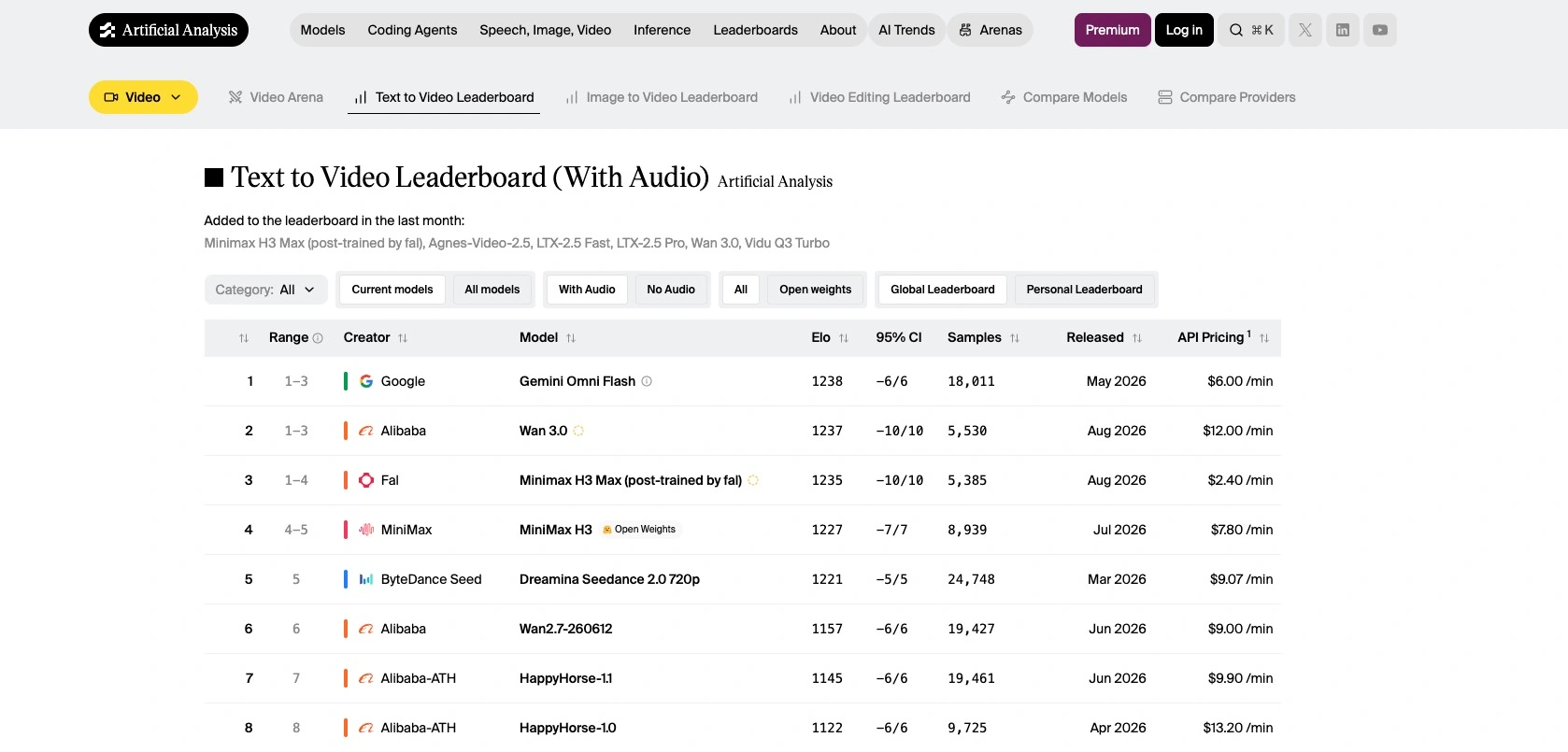
Wan 3.0 vs Seedance 2.5 vs MiniMax H3

This comparison describes the models. SeeGen AI currently accepts text, image, video, and audio inputs for Wan 3.0.

FeatureWan 3.0Seedance 2.5MiniMax H3
DeveloperAlibaba CloudByteDance SeedMiniMax
Release dateAugust 6, 2026July 31, 2026July 31, 2026
Model accessClosed weightsClosed weightsOpen weights under the MiniMax H3 Community License
Maximum duration30 seconds30 seconds15 seconds
Maximum resolution1080p1080pUp to 2K
Multimodal inputsText, image, video, audio, document, and webpageText, image, video, and audioText, image, video, and audio
Reference capacityUp to 20 assetsUp to 30 images, 10 videos, and 10 audio filesNot publicly specified
Native audioYesYesYes, with stereo audio
Video editingYesYesYes
Video extensionYesYes, with multiple extensionsNot officially listed as a core workflow
IP content flexibilityHighLimitedVaries by provider
Key advantageFlexible inputs and lower generation costLarger reference capacity and advanced production controlOpen weights, 2K output, and local deployment
Best forCreators who need flexible, affordable video workflowsComplex stories, character consistency, and professional editingDevelopers and teams that want an open model

Content restrictions may change and can vary across platforms. Users remain responsible for having the rights required to publish or commercially use generated content.

Why SeeGen AI

Why Choose SeeGen AI for Wan 3.0?

1Start free

Try Wan 3.0 for free

Create an account and join the SeeGen AI Discord community to receive 200 free credits. These credits are enough to test Wan 3.0 or Wan 3.0 Prime.

2160 credits

Lower generation cost

A five-second Wan 3.0 video at 720p uses 160 credits without video input. The same Seedance 2.5 task uses 300 credits, making Wan 3.0 a lower-cost option for testing ideas and producing videos at scale.

3Web + API

Web and API access

Use Wan 3.0 in the visual workspace or connect it to your own app through the API. Every SeeGen AI plan supports both options and uses the same credit balance.

4More models

More models in one place

Compare Wan 3.0 with Seedance 2.5 and other video models without switching platforms. Choose a model based on cost, speed, and the needs of each project.

Community discussions

What Creators Are Saying About Wan 3.0

Explore real tests, prompt experiments, model comparisons, and creator feedback shared on YouTube, Reddit, and X.

Reddit Discussions about Wan 3.0

YouTube Reviews about Wan 3.0

X Posts about Wan 3.0

Frequently asked questions

FAQs about Wan 3.0 AI Video Generator

What is the difference between Wan 3.0 and Wan 3.0 Prime?+
Wan 3.0 is the standard model. Wan 3.0 Prime offers the same main features with faster generation, but it costs more. Choose the standard version to save credits or Prime when speed matters.
Can I try Wan 3.0 free on SeeGen AI?+
Yes. Create a SeeGen AI account and join the Discord community to receive 200 credits. A five-second Wan 3.0 video at 720p uses 160 credits when no video input is included.
What generation modes does Wan 3.0 support?+
Wan 3.0 supports text-to-video, image-to-video, first-and-last-frame generation, multimodal references, video editing, and video extension.

On SeeGen AI, you can use text, images, videos, and audio as input.
What video quality and duration does Wan 3.0 support?+
Wan 3.0 can create videos from 2 to 30 seconds at 480p, 720p, or 1080p. It outputs video at 30 fps and can generate dialogue, music, and sound effects. See the Wan 3.0 specifications.
How can I write a better Wan 3.0 prompt?+
Define the subject, action, setting, camera, and visual style clearly. Keep each shot focused on one main action.

For scenes with several characters, state who is acting, who is reacting, and where each person moves. Repeat any direction that must remain consistent.
Should I use prompt enhancement?+
Prompt enhancement can add useful detail to a short prompt, but it may also change precise instructions. Enable it for simple ideas and turn it off when you need strict control over actions, timing, or camera direction.
What does the seed setting do?+
A seed helps produce a similar result when the prompt, references, and settings stay the same. It is useful for testing small prompt changes, but it cannot replace clear instructions.
Does Wan 3.0 have fewer restrictions than Seedance 2.5 for IP content?+
Yes. Wan 3.0 has fewer restrictions on prompts involving well-known characters, franchises, and copyrighted content. This gives creators more freedom when exploring IP-based ideas. Just keep the relevant usage rights in mind, especially when publishing or using the results commercially.
Start free

Give Wan 3.0 an idea and see where it takes you

Begin with a prompt, image, video, or audio reference. Create an account and join the SeeGen AI Discord community to claim 200 credits, enough to generate a five-second Wan 3.0 video at 720p and explore the full workflow.